
Forums Admin Feature
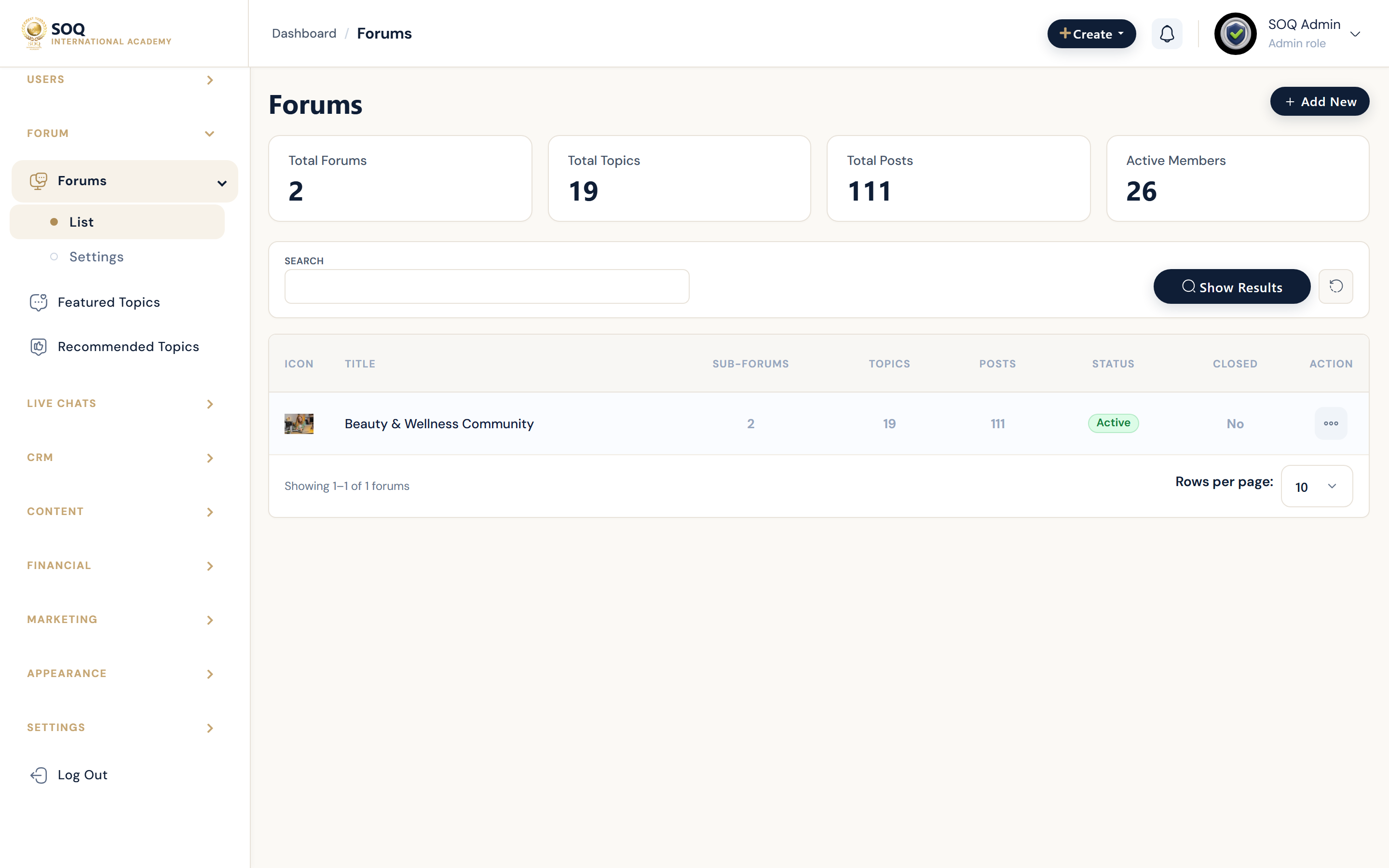
Illustrative screenshot “ Admin -> Forum ” annotated walkthrough. Screenshot controls in this image are not clickable and may not match the current live UI.
Forums Admin
What this screen is
Manage community forums, featured topics, recommended topics, and forum settings.
What you see
Forum boards, topics, featured/recommended lists, and settings.
Screenshot annotations
- 1New forum: See marker 1 on the screenshot.
- 2Search: See marker 2 on the screenshot.
- 3Filters: See marker 3 on the screenshot.
- 4Boards / topics: See marker 4 on the screenshot.
- 5Featured: See marker 5 on the screenshot.
- 6Moderate: See marker 6 on the screenshot.
Field / control guide
- Forums: Categories/boards.
- Topics: Threads inside a board.
- Featured topics: Pinned/highlighted discussions.
- Recommended: Discovery suggestions.
- Settings: Forum feature toggles.
How to complete the task
- Step 1: Create boards that match your community.
- Step 2: Feature important topics.
- Step 3: Moderate spam/abuse.
- Step 4: Verify public forum pages.
Notes / pitfalls: Public Store & Forums guide covers learner-facing UX. Admin requires Modules activation when stubbed.