
Sales List
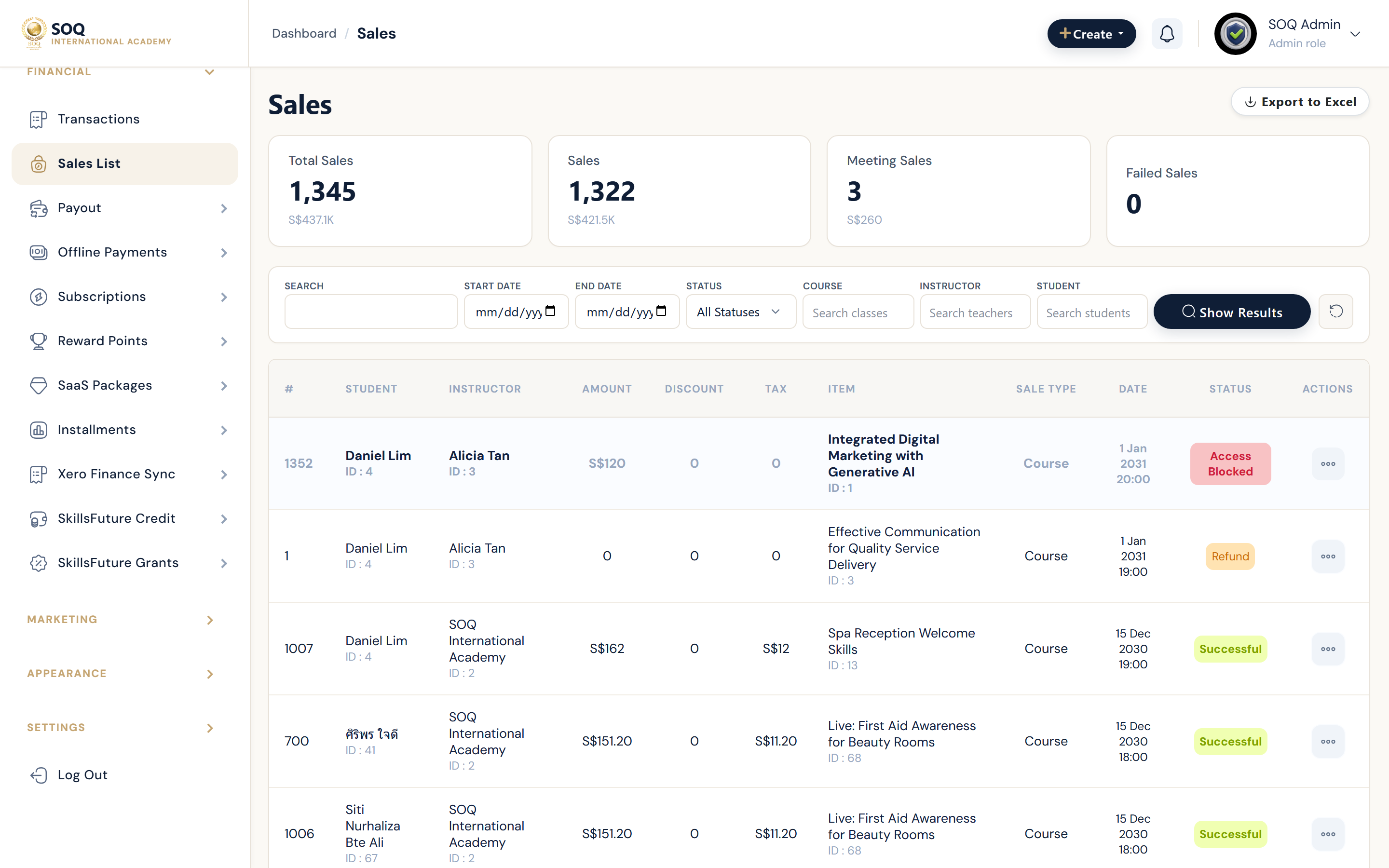
Live screenshot from the SOQ beauty demo (aiacademy.aiee.dev). Controls in the image are not clickable.
Illustrative screenshot — Admin -> Financial -> Sales list. Screenshot controls in this image are not clickable and may not match the current live UI.
Sales list
What this screen is
All sales (classes, meetings, promotion plans, subscribe plans) appear here for filtering, export, invoice print, and refunds.
What you see
Filterable transaction table with Actions for print invoice and refund.
Field / control guide
- Filters: Narrow by type, date, user, or status.
- Export: Download the sales list as Excel when available.
- Print invoice: Opens/printable invoice for the sale.
- Refund: Confirms then refunds the transaction amount.
How to complete the task
- Open Admin -> Sales list.
- Apply filters for the period you need.
- Export or print invoices as required.
- Use Refund only after confirming the payment provider refund.
Notes / pitfalls: Refunding in admin does not always reverse the gateway charge automatically - reconcile with the payment provider.