
UAT Test — Full Platform Coverage
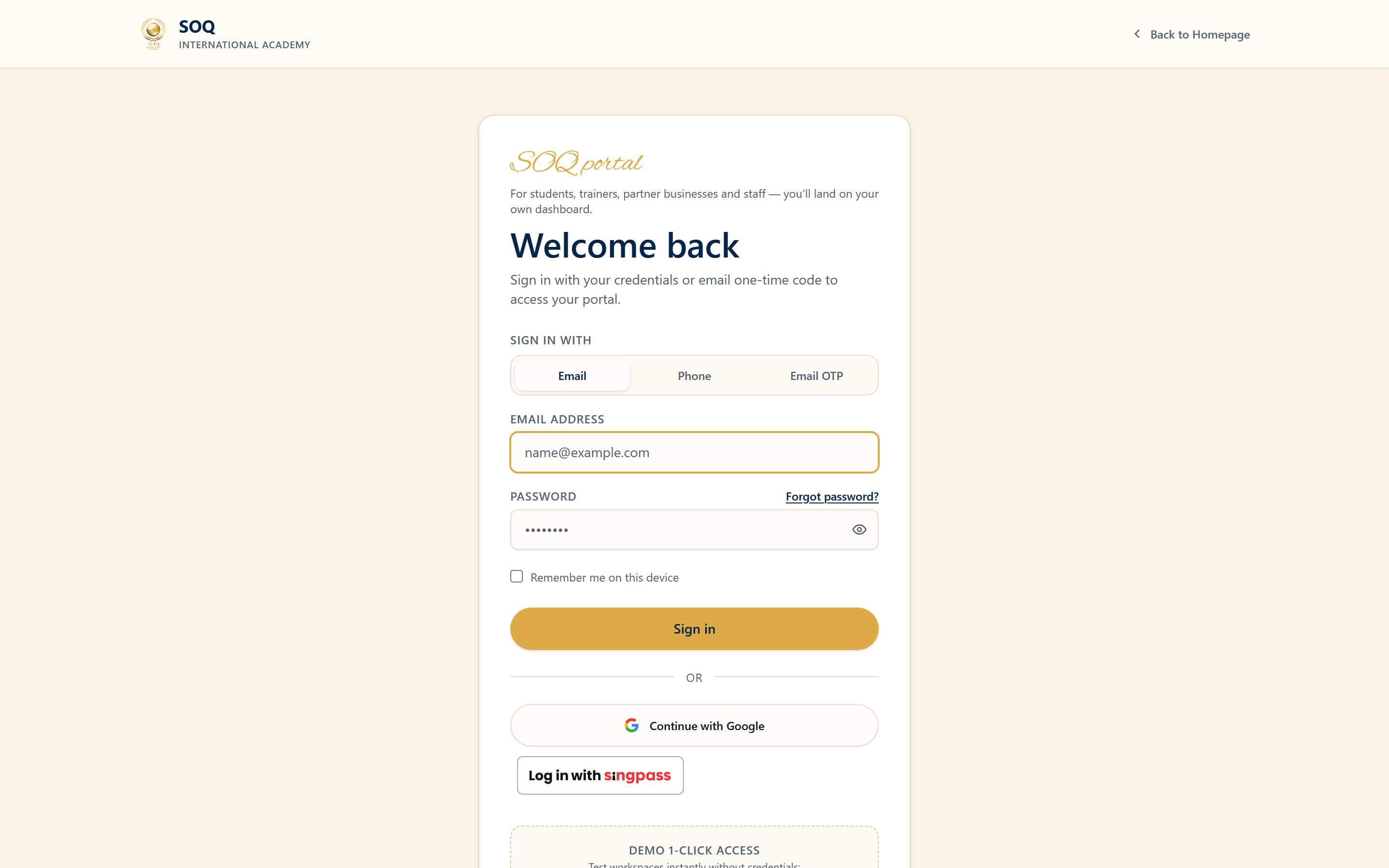
Live screenshot from the SOQ beauty demo (aiacademy.aiee.dev).
SOQ International Academy TMS · Exhaustive acceptance matrix for Public/Landing, Panel (Student / Instructor / Organization), Admin, Staff, Themes & Landing Builder · Updated 2026-09-24
/panel. Students/Instructors/Orgs never use Admin chrome.
Seed pitch data with php artisan demo:seed beauty — see Beauty Demo Pack.
admin@soq.edu.sg/Demo@1234 ·
Student student@soq.edu.sg/Demo@1234 ·
Instructor trainer@soq.edu.sg/Demo@1234 ·
Organization org@soq.edu.sg/Demo@1234 ·
Hardware demo.hw.*@soq-hw.sg/Demo@1234
| Enable DEMO_ONE_CLICK_LOGIN=true for header Demo dropdown | Full Demo Logins
Jump
- Full coverage matrix (summary)
- Public site & landing page
- Student panel
- Instructor panel
- Organization panel
- Admin console
- Staff
- Themes & landing builder
- Critical journey scripts
- Results log
- Defect report format
0. Full coverage matrix (summary)
| Suite | Who | What must be covered | Result |
|---|---|---|---|
| Public & Landing | Guest + logged-in | Home landing blocks, header/footer chrome, all major public routes | P / F / B |
| Student Panel | Student | Every Panel sidebar item available to user role | P / F / B |
| Instructor Panel | Instructor | Student-shared items + teaching/seller/blog/noticeboard tools | P / F / B |
| Organization Panel | Organization | Instructor-like tools + Members manage; no Blog | P / F / B |
| Admin | Admin | Every Admin sidebar section + Settings hub tabs | P / F / B |
| Staff | Staff | Permission-trimmed Admin only | P / F / B |
| Themes & Landing | Admin | Themes, headers/footers, homepage + custom landings | P / F / B |
| Critical journeys | All roles | Enroll/learn, teach, book meeting, checkout, admin ops | P / F / B |
1. Public site & frontend landing
Role: Guest (then Student for auth-only paths) | Login: logged out, then /demo-login/student
For every row: open the URL/menu, confirm page loads (no 500/blank), chrome matches role, mark Pass / Fail / Blocked. Use Blocked (feature toggle) when the env shows Feature not activated or the feature toggle is off.
1A. Homepage / landing composition
- Open
/— confirm it uses the assigned Landing Builder page (not a blank shell). - Scroll every enabled component: heroes, course grids, instructors/orgs, education verticals, statistics, blog, store, jobs, events, meetings, CTAs, FAQ, logos, sliders.
- Click each primary CTA (Explore Courses, Book a Meeting, Start Learning, etc.) and verify destination.
- Resize to mobile: header drawer, hero, and CTAs remain usable.
| Area | Screen / item | Path | Check | Result |
|---|---|---|---|---|
| Landing / Home | Homepage loads | / | Hero + landing components render; SOQ branding | P / F / B |
| Landing / Home | Featured / newest / best courses blocks | / | Course cards link to /course/{slug} | P / F / B |
| Landing / Home | Instructors / orgs / stats / blog / store blocks | / | Blocks match CMS landing; empty OK if unused | P / F / B |
| Landing / Home | Education verticals (if configured) | /education-verticals/{slug} | Vertical page opens | P / F / B |
| Chrome | Header logo ? home | / | Returns to home | P / F / B |
| Chrome | Search | /search | Results or empty state | P / F / B |
| Chrome | Categories mega-menu | /categories/... | Category/subcategory catalogue | P / F / B |
| Chrome | Cart drawer | header cart | Drawer opens; line items if any | P / F / B |
| Chrome | Footer links + newsletter | footer | Links resolve; newsletter form validates | P / F / B |
| Chrome | Floating bar / ad modal / cookies | overlays | Show once per rules; dismissible | P / F / B |
| Courses | Catalogue | /classes | Filters + course cards | P / F / B |
| Courses | Tags / reward courses | /tags/... , /reward-courses | Lists load or feature-off state | P / F / B |
| Courses | Course detail tabs | /course/{slug} | About, Content, Reviews, Comments | P / F / B |
| Courses | Learning page (enrolled) | /course/learning/{slug} | Lessons/progress; auth required | P / F / B |
| Bundles | List + detail | /bundles , /bundles/{slug} | Bundle page + enroll CTA | P / F / B |
| Upcoming | List + detail | /upcoming_courses | Teasers / notify | P / F / B |
| Instructors | List | /instructors | Instructor cards | P / F / B |
| Organizations | List | /organizations | Org cards | P / F / B |
| Finder | Instructor finder + wizard | /instructor-finder | Search + profile + reserve path | P / F / B |
| Profile | Public user/org profile tabs | /users/{username}/profile | About/Courses/Products/Articles/Forum/Badges/Meetings | P / F / B |
| Store | Products list + detail | /products , /products/{slug} | Buy/cart when Store on | P / F / B |
| Blog | List + post | /blog , /blog/{slug} | Posts render | P / F / B |
| Forums | Index + topic | /forums | Browse/create when Forums on | P / F / B |
| Auth | Login | /login | Form + demo buttons if enabled | P / F / B |
| Auth | Register | /register | Student (+ instructor/org options if enabled) | P / F / B |
| Auth | Forgot / reset / verify | /forget-password , /verification | Flows complete without 500 | P / F / B |
| Cart | Cart overview | /cart | Totals; proceed to payment | P / F / B |
| Cart | Checkout / payment channels | /cart payment | Gateway or offline option renders | P / F / B |
| Become instructor | Apply + packages | /become-instructor | Form + packages when enabled | P / F / B |
| Events | List + detail + tickets | /events | Feature gate; detail tabs | P / F / B |
| Jobs | List + detail + apply | /jobs | Feature gate; apply when logged in | P / F / B |
| Meeting packages | Public packages | /meeting-packages | Purchase/free path | P / F / B |
| Forms | Custom form | /forms/{url} | Submit + validation | P / F / B |
| Gifts | Gift purchase (auth) | /gift/... | Auth required | P / F / B |
| Installments / Subscribes | Plan details | /installments , /subscribes | Feature-gated pages | P / F / B |
| Certificates | Public validation | /certificate_validation | Validate by code | P / F / B |
| Contact / CMS | Contact + custom pages | /contact , /pages/{link} | Forms/pages load | P / F / B |
| Landings | Custom landing URL | /landings/{url} | Published landing renders | P / F / B |
| Errors | 404 themed | /not-a-real-page-xyz | Branded 404 | P / F / B |
2. Student panel (role: user)
Role: Student | Login: /demo-login/student ? /panel
For every row: open the URL/menu, confirm page loads (no 500/blank), chrome matches role, mark Pass / Fail / Blocked. Use Blocked (feature toggle) when the env shows Feature not activated or the feature toggle is off.
Must NOT see: Members (org), Create course/bundle/event/job, meeting settings/requests (instructor), store seller tools, sales report, blog articles, noticeboard create, Admin chrome.
| Section | Menu / screen | Path | Check | Result |
|---|---|---|---|---|
| Main | Dashboard | /panel | Student stats (classes/following) | P / F / B |
| Main | Events calendar | /panel/events-calender | Calendar loads | P / F / B |
| Courses | My purchases | /panel/courses/purchases | Purchased courses list | P / F / B |
| Courses | My comments | /panel/courses/...comments | Comments list | P / F / B |
| Courses | Favorites | /panel/...favorites | Favorites list | P / F / B |
| Courses | Course notes | /panel/...notes | Feature-gated | P / F / B |
| Courses | My attendances | /panel/courses/my-attendances | Attendance feature-gated | P / F / B |
| Upcoming | Following | /panel/upcoming... | Feature upcoming_courses | P / F / B |
| Events | My purchases / comments | /panel/events... | Feature events | P / F / B |
| Meetings | My reservation | /panel/meetings/reservation | Reservations list | P / F / B |
| Meetings | Purchased packages | /panel/meetings...packages | Meeting packages feature | P / F / B |
| Jobs | My requests / comments / bookmarks | /panel/jobs... | Feature jobs | P / F / B |
| Assignments | My assignments | /panel/assignments... | Assignment feature | P / F / B |
| Quizzes | My results / not participated | /panel/quizzes... | Quiz lists | P / F / B |
| Certificates | My achievements | /panel/certificates... | Certificates + validation link | P / F / B |
| Store | My purchases / comments | /panel/products... | Store access gate | P / F / B |
| Financial | Summary / Payout / Charge / Subscribes / Installments | /panel/financial... | Wallets & plans | P / F / B |
| Marketing | Affiliates / Registration bonus / Coupons | /panel/marketing... | Only if affiliate/bonus/coupons on | P / F / B |
| Rewards | Rewards | /panel/rewards | Rewards settings | P / F / B |
| Support | New / Classes support / Tickets | /panel/support... | Support forms | P / F / B |
| Chat | Public chat | /panel/public-chat | Public chat feature | P / F / B |
| Forums | New topic / My topics / posts / bookmarks | /panel/forums... + /forums/create-topic | Forums on | P / F / B |
| User | Notifications | /panel/notifications | Notification list | P / F / B |
| User | AI contents | /panel/ai-contents | AI feature gate | P / F / B |
| User | Settings | /panel/setting | Profile settings | P / F / B |
| User | Log out | /logout | Returns to public | P / F / B |
3. Instructor panel (role: teacher)
Role: Instructor | Login: /demo-login/instructor ? /panel
For every row: open the URL/menu, confirm page loads (no 500/blank), chrome matches role, mark Pass / Fail / Blocked. Use Blocked (feature toggle) when the env shows Feature not activated or the feature toggle is off.
Re-check all Student-shared items that also appear for teachers, then every instructor-only row below.
| Section | Menu / screen | Path | Check | Result |
|---|---|---|---|---|
| Courses | New course wizard | /panel/courses/new | 8-step wizard loads | P / F / B |
| Courses | My classes | /panel/courses | Instructor courses | P / F / B |
| Courses | Invited classes | /panel/courses/invited | Invites list | P / F / B |
| Courses | Org classes (if organ_id) | /panel/courses/organization | Org-linked classes | P / F / B |
| Courses | My class comments | /panel/courses/... | Class comments | P / F / B |
| Courses | Attendances (instructor) | /panel/courses/...attendances | Session attendance | P / F / B |
| Upcoming | New / My upcoming | /panel/upcoming_courses... | Create + list | P / F / B |
| Bundles | New / My bundles | /panel/bundles... | Bundle create + list | P / F / B |
| Events | New / My events / Org events / Comments | /panel/events... | Event CRUD | P / F / B |
| Meetings | Requests | /panel/meetings | Incoming requests | P / F / B |
| Meetings | Settings (availability) | /panel/meetings/settings | Slots save | P / F / B |
| Meetings | Sold meeting packages | /panel/meetings...sold | Sales list | P / F / B |
| Jobs | New / My jobs / Comments | /panel/jobs... | Job CRUD | P / F / B |
| Assignments | List + Students assignments | /panel/assignments... | Review submissions | P / F / B |
| Quizzes | New / List / Results | /panel/quizzes... | Quiz builder + results | P / F / B |
| Certificates | List / All students | /panel/certificates... | Issue/list | P / F / B |
| Store | New product / Products / Sales / Comments | /panel/store... | Seller tools | P / F / B |
| Financial | Sales report / Registration packages | /panel/financial... | Teacher finance | P / F / B |
| Marketing | Discounts / Promotions | /panel/marketing... | Teacher promos | P / F / B |
| Blog | New article / My articles / Comments | /panel/blog... | Teacher-only blog | P / F / B |
| Noticeboard | History / New / Course notices | /panel/noticeboard... | Notices | P / F / B |
| User | My public profile | /users/{username}/profile | Public profile opens | P / F / B |
4. Organization panel
Role: Organization | Login: /demo-login/organization ? /panel
For every row: open the URL/menu, confirm page loads (no 500/blank), chrome matches role, mark Pass / Fail / Blocked. Use Blocked (feature toggle) when the env shows Feature not activated or the feature toggle is off.
Same education/store/financial tools as instructor except Blog (teacher-only). Plus Members management.
| Section | Menu / screen | Path | Check | Result |
|---|---|---|---|---|
| Members | Instructors New / List | /panel/manage/instructors... | Create + list instructors | P / F / B |
| Members | Students New / List | /panel/manage/students... | Create + list students | P / F / B |
| Courses | Org classes | /panel/courses/organization | Org course list | P / F / B |
| Events | Org events | /panel/events... | Org events if feature on | P / F / B |
| Note | No Blog menu | — | Blog must NOT appear for Organization (teacher-only) | P / F / B |
| Parity | Instructor-like menus (courses, meetings, store, financial, noticeboard) | /panel/... | Open each teaching menu; confirm org capacity/seat messaging where shown | P / F / B |
5. Admin console
Role: Admin | Login: /demo-login/admin ? /admin
For every row: open the URL/menu, confirm page loads (no 500/blank), chrome matches role, mark Pass / Fail / Blocked. Use Blocked (feature toggle) when the env shows Feature not activated or the feature toggle is off.
Open every sidebar parent and child. If a page shows Feature not activated, mark B and confirm Activations / soq.edu.sg wording (not marketplace purchase copy).
| Section | Menu / screen | Path | Check | Result |
|---|---|---|---|---|
| Dashboards | General dashboard | /admin | KPIs load | P / F / B |
| Dashboards | Marketing dashboard | /admin marketing dashboard | Marketing KPIs | P / F / B |
| Education | Classes: New / Courses / Live / Text / Agora history / Notes | Education ? Classes | Each child opens | P / F / B |
| Education | Bundles New / List | Education ? Bundles | CRUD list | P / F / B |
| Education | Upcoming New / List | Education ? Upcoming | CRUD list | P / F / B |
| Education | Events New / List / Sold tickets / Settings | Education ? Events | Feature-toggle aware | P / F / B |
| Education | Quizzes | Education ? Quizzes | Quiz admin | P / F / B |
| Education | Certificates (quiz/course/templates/settings) | Education ? Certificates | Templates + settings | P / F / B |
| Education | Assignments / Course forum / Course notices | Education ? ... | Each leaf opens | P / F / B |
| Education | Enrollment Add + History | Education ? Enrollment | May be activation stub | P / F / B |
| Education | Waitlists | Education ? Waitlists | Queue list | P / F / B |
| Education | Categories New/List/Trends + Filters New/List | Education ? Categories/Filters | Taxonomy | P / F / B |
| Education | Reviews | Education ? Reviews | Moderation list | P / F / B |
| Education | Attendances History + Settings | Education ? Attendances | Attendance ops | P / F / B |
| Appointments | Consultants / Appointments | Appointments | Consultant + booking lists | P / F / B |
| Appointments | Meeting packages Create/Lists/Sold/Settings | Appointments ? Packages | Package ops | P / F / B |
| Users | New / All / Staff / Students / Instructors / Organizations | Users ? lists | Each list filters correctly | P / F / B |
| Users | Not access to content | Users | Restriction list | P / F / B |
| Users | Roles New/List + Groups New/List + Badges | Users ? Roles/Groups/Badges | RBAC screens | P / F / B |
| Users | Instructor requests + Delete-account + IP mgmt | Users ? ... | Requests + login history + IP | P / F / B |
| Forum | Forums / Featured / Recommended + Settings | Forum | Forum admin | P / F / B |
| Live chat | Rooms / Public chats / Settings | Live chat | Chat admin | P / F / B |
| CRM | Support tickets New/List/Departments | CRM ? Support | Ticket ops | P / F / B |
| CRM | Class conversations + Comments (all types) + Reports | CRM | Moderation | P / F / B |
| CRM | Contacts / Noticeboard / Notifications | CRM | Comms tools | P / F / B |
| Content | Store (products/orders/sellers/categories/...) | Content ? Store | Full store admin or stub | P / F / B |
| Content | Jobs (lists/applications/categories/settings) | Content ? Jobs | Jobs admin or stub | P / F / B |
| Content | Blog + Pages + Additional pages + Testimonials + Tags | Content | CMS | P / F / B |
| Content | Regions / Form builder / AI contents / Delete requests / Instructor finder | Content | Each opens | P / F / B |
| Financial | Balances / Sales / Payout / Offline payments | Financial | Money ops | P / F / B |
| Financial | Subscribes / Rewards / Registration packages / Installments | Financial | Plans & rewards | P / F / B |
| Marketing | Discounts / Cart discount / Special offers / Abandoned cart | Marketing | Promo tools | P / F / B |
| Marketing | Feature webinars / Cashback / Gifts / Promotions / Ads / Newsletters | Marketing | Growth tools | P / F / B |
| Marketing | Affiliate / Registration bonus / Ad modal / Bars / Purchase notifications / Badges | Marketing | Each leaf | P / F / B |
| Appearance | Themes (new/list/colors/fonts/headers/footers) | Appearance ? Themes | Theme library | P / F / B |
| Appearance | Landing builder New + All pages | Appearance ? Landing builder | Builder opens | P / F / B |
| Settings | Bulk imports / Translator / Activations | Settings | Ops tools | P / F / B |
| Settings | Settings hub: General / Financial / Personalization / Notifications / SEO / Mobile / Update | Settings ? hub | Each card + tabs | P / F / B |
6. Staff (permission-trimmed Admin)
Role: Staff | Login: /demo-login/staff ? /admin
For every row: open the URL/menu, confirm page loads (no 500/blank), chrome matches role, mark Pass / Fail / Blocked. Use Blocked (feature toggle) when the env shows Feature not activated or the feature toggle is off.
| Section | Menu / screen | Path | Check | Result |
|---|---|---|---|---|
| Access | Land on /admin not /panel | /demo-login/staff | Admin chrome only | P / F / B |
| Menus | Visible menus ? Staff role permissions | sidebar | Missing items vs Admin noted | P / F / B |
| Denied | Restricted admin URL | known denied path | 403 or hidden — not full access | P / F / B |
| Education ops | Review courses / Categories / Filters / Reviews | Education ops docs | Permitted pages work | P / F / B |
| Users ops | User lists Staff can access | Users | No role-edit if not permitted | P / F / B |
7. Themes & Landing Builder
Role: Admin | Login: Admin ? Appearance
For every row: open the URL/menu, confirm page loads (no 500/blank), chrome matches role, mark Pass / Fail / Blocked. Use Blocked (feature toggle) when the env shows Feature not activated or the feature toggle is off.
| Section | Menu / screen | Path | Check | Result |
|---|---|---|---|---|
| Themes | List themes / activate | Admin ? Themes | Active theme applies to public | P / F / B |
| Themes | Colors / Fonts | Themes ? colors/fonts | Public CSS variables update | P / F / B |
| Themes | Header_1 / Header_2 / Mobile | Themes ? headers | Public header matches | P / F / B |
| Themes | Footer_1 / Footer_2 | Themes ? footers | Footer links/newsletter | P / F / B |
| Landing | Edit homepage landing components | Landing builder | Home composition edits save | P / F / B |
| Landing | Publish custom /landings/{url} | Landing pages | Public URL renders | P / F / B |
| Landing | Hero variants used on home | two_columns_hero / full_width / sliding_courses / etc. | CTA + images OK | P / F / B |
| Landing | Course grids on home | featured/newest/best/discounted/free/custom/multi_tab | Cards + links | P / F / B |
| Landing | Instructors / orgs / verticals / stats / blog / store / jobs / events / meetings | home components | Each enabled block | P / F / B |
8. Critical journey scripts (deep checks)
After smoke-opening every menu above, run these end-to-end cases with real clicks and data.
CJ-01 — Guest ? Landing ? Catalogue ? Course ? Login
| Steps |
|
|---|---|
| Expected | Landing and catalogue work; auth gate correct; post-login enrollment succeeds. |
| Result | Pass / Fail / Blocked — notes: |
CJ-02 — Student learn path
| Steps |
|
|---|---|
| Expected | Learning page usable; evaluation tools reachable without Admin chrome. |
| Result | Pass / Fail / Blocked — notes: |
CJ-03 — Student book meeting
| Steps |
|
|---|---|
| Expected | Reservation created and visible to student. |
| Result | Pass / Fail / Blocked — notes: |
CJ-04 — Instructor create course (all wizard steps)
| Steps |
|
|---|---|
| Expected | Wizard completes; course listed for instructor and visible to Admin review flow. |
| Result | Pass / Fail / Blocked — notes: |
CJ-05 — Instructor meetings + availability
| Steps |
|
|---|---|
| Expected | Availability drives public booking; requests list works. |
| Result | Pass / Fail / Blocked — notes: |
CJ-06 — Instructor store / blog / noticeboard (when enabled)
| Steps |
|
|---|---|
| Expected | Seller/content tools publish to public surfaces when features on. |
| Result | Pass / Fail / Blocked — notes: |
CJ-07 — Organization manage members
| Steps |
|
|---|---|
| Expected | Org can manage people in Panel; not full Admin; no Blog. |
| Result | Pass / Fail / Blocked — notes: |
CJ-08 — Cart / checkout / offline payment
| Steps |
|
|---|---|
| Expected | Checkout happy path works; offline pending state explained in UI. |
| Result | Pass / Fail / Blocked — notes: |
CJ-09 — Admin education + users smoke
| Steps |
|
|---|---|
| Expected | Core admin ops load; feature flags match what Public/Panel showed as B. |
| Result | Pass / Fail / Blocked — notes: |
CJ-10 — Homepage landing builder round-trip
| Steps |
|
|---|---|
| Expected | Landing/theme edits reflect on public frontend. |
| Result | Pass / Fail / Blocked — notes: |
CJ-11 — Module gate wording
| Steps |
|
|---|---|
| Expected | SOQ gate copy only. |
| Result | Pass / Fail / Blocked — notes: |
CJ-12 — Staff vs Admin permission contrast
| Steps |
|
|---|---|
| Expected | Staff is trimmed Admin on /admin only. |
| Result | Pass / Fail / Blocked — notes: |
9. Results log
| Suite | Rows tested | Pass | Fail | Blocked | Sign-off |
|---|---|---|---|---|---|
| Public & Landing | |||||
| Student Panel | |||||
| Instructor Panel | |||||
| Organization Panel | |||||
| Admin Console | |||||
| Staff | |||||
| Themes & Landing Builder | |||||
| Critical journeys CJ-01…CJ-12 |
10. Defect report format
- Suite + row / CJ-ID
- Role + account
- Surface (Public / Panel / Admin) + full URL
- Steps, expected vs actual
- Screenshot + console/network if 4xx/5xx
- Feature flag / activation if Blocked
Related: Frontend Master Guide · Screen Map · Documentation/Technical/MASTER_TECHNICAL_DOCUMENTATION.md