
Feature Pack Bundle
The Platform Feature Pack catalogs 59 optional features. On this SOQ TMS beauty build, enable them under Admin → Features / Settings. Theme Builder and Mobile App remain separate optional features (not part of the 59 count). Singapore-only grants, identity, and finance integrations are 9 deferred items — see Singapore & Regulatory modules.
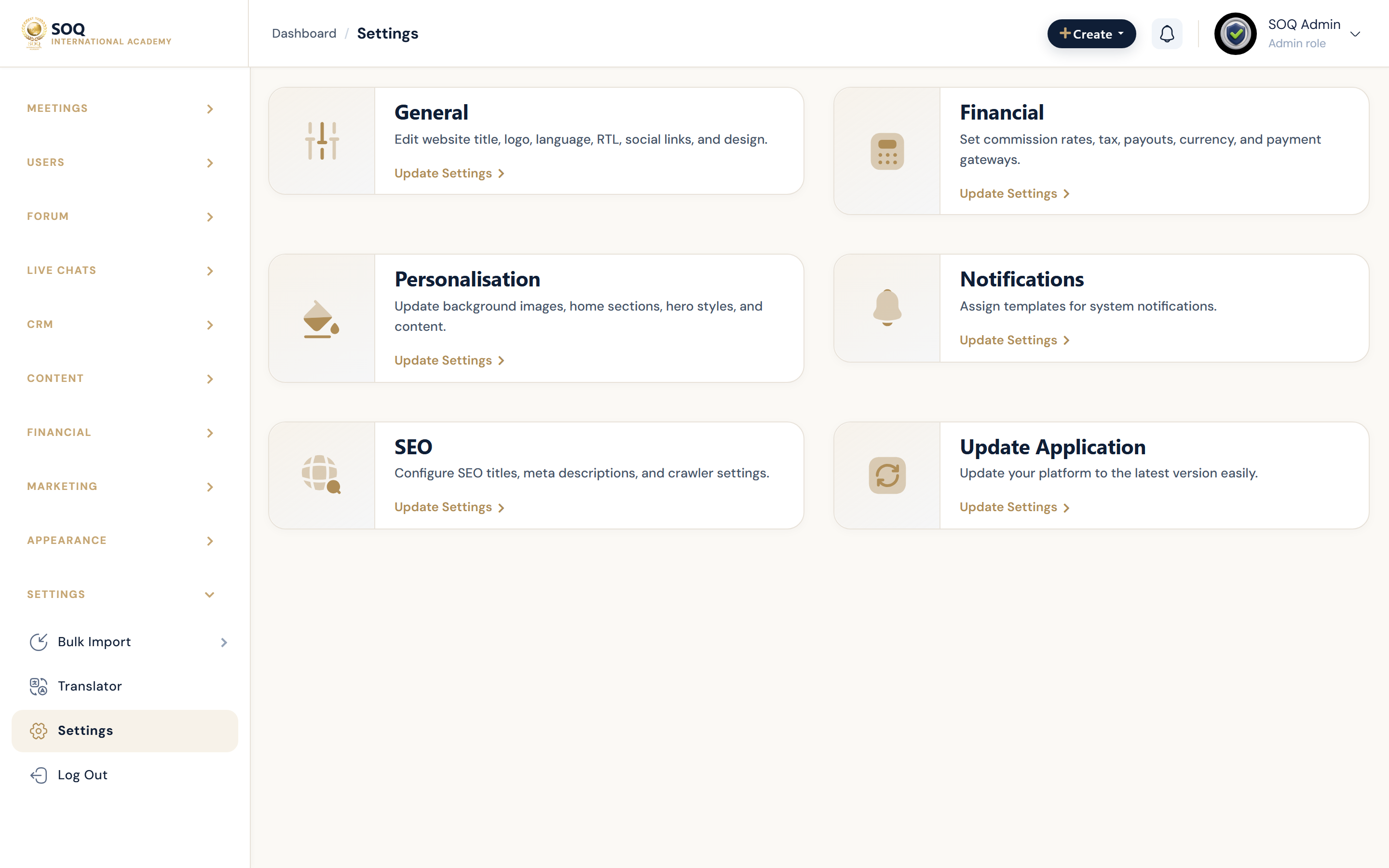
Live screenshot from the SOQ beauty demo (aiacademy.aiee.dev).
Surfaces, roles and current terminology
| Surface | Current navigation terminology | Status |
|---|---|---|
| Features / Settings | Admin → Features / Settings | Core (enable optional features) |
| Optional Admin modules | Store, Forums, Jobs, Meetings, and other pack features | Toggle per feature |
| Activation workflow | Admin → Features / Settings | Standard operating path |
| Catalog size | 59 Platform Feature Pack items (+ Theme / Mobile separate) | Catalog reference |
| Subscription | Subscription plans for course access alongside direct purchase. (primary audience: Administrators) | Platform Feature Pack |
| Offline Payment | Bank-transfer payment requests with admin approval. (primary audience: Staff) | Platform Feature Pack |
| Payment Gateways Pack | Extended checkout gateways beyond the core payment set. (primary audience: Administrators) | Platform Feature Pack |
| Quiz & Certification | Quizzes, auto/manual grading, and course/quiz certificates. (primary audience: Instructors) | Platform Feature Pack |
| Meeting Booking | Instructor availability, hourly rates, and bookable meeting slots. (primary audience: Instructors) | Platform Feature Pack |
| Text Courses | Text-based lessons with optional video and downloadable files. (primary audience: Instructors) | Platform Feature Pack |
| SMS Authentication | SMS-based login and registration. (primary audience: Shared) | Platform Feature Pack |
| Noticeboard | Panel notices for instructors, students, or all users. (primary audience: Staff) | Platform Feature Pack |
| BigBlueButton Integration | Live class sessions via BigBlueButton. (primary audience: Instructors) | Platform Feature Pack |
| Organizational Education | Multi-organization accounts with private/public org courses. (primary audience: Organizations) | Platform Feature Pack |
| Multi-language Content | Per-locale content loading by user language. (primary audience: Administrators) | Platform Feature Pack |
| Affiliate & Referral Marketing | Referral links and commission earning on sales. (primary audience: Staff) | Platform Feature Pack |
| SCORM Courses | Publish SCORM packages from Captivate, iSpring, and similar tools. (primary audience: Instructors) | Platform Feature Pack |
| In-App Live Class | In-platform live classes with chat and screen share. (primary audience: Instructors) | Platform Feature Pack |
| SaaS Packages | Limit courses, meetings, live capacity, and org seats by package. (primary audience: Administrators) | Platform Feature Pack |
| Reward Points System | Loyalty points for purchases, learning activity, and redemptions. (primary audience: Staff) | Platform Feature Pack |
| Tutor Finder | Wizard to match students with instructors by subject, time, and location. (primary audience: Students) | Platform Feature Pack |
| Forum & Community | Site-wide community forums and discussion topics. (primary audience: Shared) | Platform Feature Pack |
| Course Forum | Per-course Q&A between students and the instructor. (primary audience: Students) | Platform Feature Pack |
| Course Bundle | Sell multiple courses as one package. (primary audience: Organizations) | Platform Feature Pack |
| Store & Marketplace | Physical/virtual products and multi-vendor storefront. (primary audience: Staff) | Platform Feature Pack |
| Drip Content | Time/sequence locks on chapters and learning files. (primary audience: Instructors) | Platform Feature Pack |
| Private Mode / Internal LMS | Restrict which users may enroll in courses (catalog SKU name; product is SOQ TMS). (primary audience: Administrators) | Platform Feature Pack |
| Manual Enrollment | Admin enrollment into courses, bundles, and products. (primary audience: Staff) | Platform Feature Pack |
| Assignment & Homework | Course assignments with grades, deadlines, and submissions. (primary audience: Instructors) | Platform Feature Pack |
| Course Statistics & Analytics | Graphical course performance and activity stats. (primary audience: Instructors) | Platform Feature Pack |
| Course Noticeboard | Colored notices for students inside a course. (primary audience: Instructors) | Platform Feature Pack |
| In-App Video Call | Peer/group video calls for booked meetings on-platform. (primary audience: Instructors) | Platform Feature Pack |
| Registration Bonus | Wallet or credit bonus rules for new registrations. (primary audience: Staff) | Platform Feature Pack |
| Cashback | Percentage or fixed cashback after purchases. (primary audience: Staff) | Platform Feature Pack |
| Question Bank | Reusable quiz questions with random or sorted draws. (primary audience: Instructors) | Platform Feature Pack |
| Upcoming Courses | Tease unpublished courses and notify followers. (primary audience: Instructors) | Platform Feature Pack |
| Installments / Partial Payment | Payment plans with reminders and overdue access control. (primary audience: Staff) | Platform Feature Pack |
| Secure Host | Protected video hosting to reduce unwanted downloads. (primary audience: Administrators) | Platform Feature Pack |
| Jitsi Meetings | Live classes via Jitsi. (primary audience: Instructors) | Platform Feature Pack |
| Course Waitlist | Waitlists when capacity is full or a course is in progress. (primary audience: Staff) | Platform Feature Pack |
| Gift Products | Gift courses/products to others on a chosen date. (primary audience: Students) | Platform Feature Pack |
| Multi-Currency | Sell in multiple currencies with gateway-per-currency rules. (primary audience: Administrators) | Platform Feature Pack |
| AI Content Generator | Generate text/images for courses, SEO, and blog drafts. (primary audience: Staff) | Platform Feature Pack |
| Form Builder | Custom forms for surveys and registration flows. (primary audience: Staff) | Platform Feature Pack |
| Course Notes | Private learner notes on course sections with attachments. (primary audience: Students) | Platform Feature Pack |
| IP & Access Management | Login history, session kill, and IP/country blocks. (primary audience: Administrators) | Platform Feature Pack |
| Abandoned Cart | Reminders/coupons for incomplete checkouts. (primary audience: Staff) | Platform Feature Pack |
| Sales Pop-up | Automatic social-proof purchase notifications. (primary audience: Staff) | Platform Feature Pack |
| Cart Discount | Cart-page promotional coupon prompts. (primary audience: Staff) | Platform Feature Pack |
| Drag & Drop Certificate Builder | Visual certificate templates with QR and signatures. (primary audience: Staff) | Platform Feature Pack |
| Attendance System | Present/absent/delayed tracking for live sessions. (primary audience: Instructors) | Platform Feature Pack |
| Event Booking | Ticketed in-person or online events. (primary audience: Instructors) | Platform Feature Pack |
| Bulk Import | CSV import for users, courses, products, and categories. (primary audience: Administrators) | Platform Feature Pack |
| Content Watermarking | Dynamic/static watermarks on learning videos. (primary audience: Administrators) | Platform Feature Pack |
| Advanced Subscription | Plan-scoped content access with renewals and custom pricing. (primary audience: Administrators) | Platform Feature Pack |
| Meeting Packages | Sell bundles of live consultation sessions. (primary audience: Instructors) | Platform Feature Pack |
| Free Mode | Disable payments and offer fully free access. (primary audience: Administrators) | Platform Feature Pack |
| Job Board | Job posts, applications, and hiring workflows. (primary audience: Staff) | Platform Feature Pack |
| Course Live Chatroom | Real-time course chat for participants. (primary audience: Students) | Platform Feature Pack |
| Private 1-to-1 Chat | Direct private chat for pre/post sale support. (primary audience: Shared) | Platform Feature Pack |
| Advanced Affiliate | Exclusive affiliate links per content item. (primary audience: Staff) | Platform Feature Pack |
| Built-in Zoom Live System | In-product Zoom live class tooling. (primary audience: Instructors) | Platform Feature Pack |
| Integrated Whiteboard System | Whiteboard for in-app live classes. (primary audience: Instructors) | Platform Feature Pack |
| Theme Builder (separate activation) | Appearance ? Themes & Landing Builder — not counted in the Platform Feature Pack total | Separate activation |
| Mobile App (separate activation) | Technical Configuration ? Mobile API / Mobile App — not counted in the Platform Feature Pack total | Separate activation |
Permissions, settings and activation
- Enable needed features under Admin → Features / Settings before troubleshooting missing menus.
- Staff need Settings / Features permission to manage optional modules on this build.
- If a feature is off in Features / Settings, the Admin menu may hide or stub it — turn the feature on, then clear cache.
- Theme Builder and Mobile App are separate product entitlements; they are not enabled via a Platform Feature Pack UUID.
- Docs sidebar may group several modules into one guide; use Core vs Features for the product total.
- After activation, retest each needed feature from its own sidebar entry because permissions, settings, and publish status can still control visibility.
- Match Feature Pack ZIP version to the live platform version before uploading
plugin_bundle.zip.
Install or refresh Feature Pack files (ZIP)
SOQ Source usually already includes Feature Pack code. Use this path when applying an official Features package ZIP (for example after a pack release that adds gateways or modules), or when support asks you to re-apply plugin_bundle.zip.
- Confirm the Features package version matches your installed platform version.
- Open Admin ? Settings ? Update Application ? Update via ZIP File.
- Select
plugin_bundle.zipfrom the Features package (Installation / How to Install Plugins folder) and click Update. - When installation confirms, go to Settings ? Update ? Update Database ? Run Update.
- Clear cache, then confirm the needed toggles under Features / Settings and smoke-test those Admin screens.
New gateway rows appear on Settings ? Financial ? Payment channels only after Update Database. Then configure credentials — see Payment Gateways ? Add pack gateways.
Core workflows
Enable Platform Feature Pack items
- Open Admin → Features / Settings.
- Enable the optional features your academy needs (Store, Forums, Jobs, Meetings, etc.).
- Save, clear cache if needed, then open each Admin menu and confirm the UI loads.
Diagnose a missing or stubbed feature
- Note which Admin feature is missing or stubbed.
- Confirm it is toggled on under Features / Settings.
- Confirm the staff role has the matching Admin permission.
- Clear application cache and hard-refresh Admin.
Theme Builder or Mobile App
- Identify whether the missing UI is a Feature Pack item, Theme Builder, or Mobile App.
- Theme / Mobile are separate commercial entitlements — contact soq.edu.sg if your contract should include them; do not look for a Activations form on this build.
- Retest only the surfaces owned by that entitlement.
Result states
- Success: Needed features are enabled and Admin screens render fully.
- Pending: Feature toggle not saved, or cache still serving old menus.
- Denied: Staff role lacks Features / module permissions.
- Error: Cache or deploy mismatch; clear caches and check server logs — reapply feature settings only if required.