
Hosting Recommendation
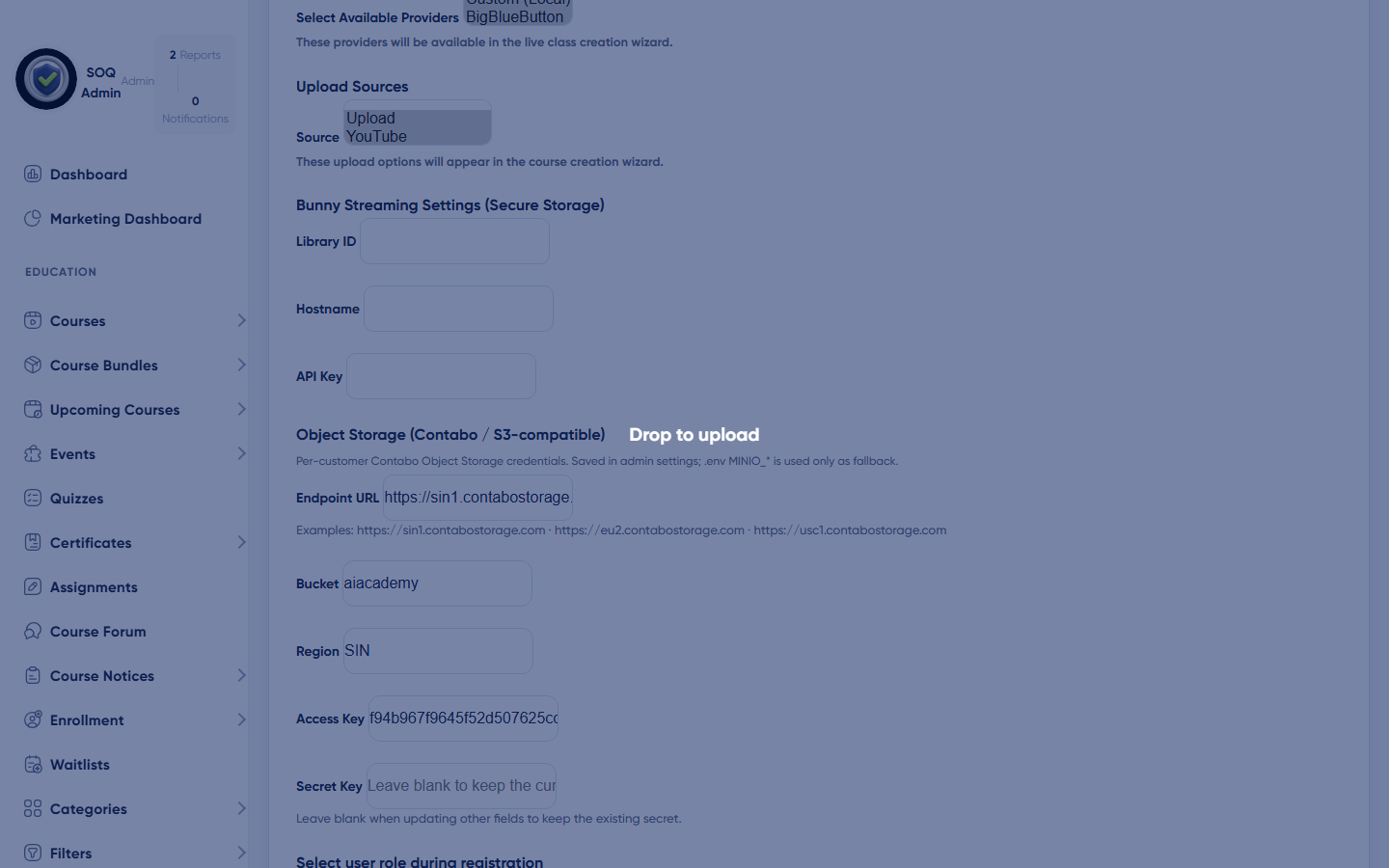
Live screenshot from the SOQ beauty demo (aiacademy.aiee.dev).
Production server profile (standard)
What this is
SOQ TMS production deployments use Contabo for both the application server (VPS) and Contabo Object Storage for course/media uploads. This is the standard for the AI Academy reference deploy (https://aiacademy.aiee.dev) and for all new client installs. Customers only need the technical requirements below — SOQ provisions Contabo VPS + Object Storage; AWS S3 and Bunny Stream are not part of the SOQ path.
Hardware requirements (one production Contabo node)
- CPU: 6 dedicated physical cores (or equivalent), modern server CPU at about 2.8 GHz class.
- Memory (RAM): 32 GB.
- Storage: 240 GB NVMe SSD (application, database, caches, uploads, logs).
- Network port: at least 250 Mbit/s dedicated uplink.
- Traffic: unlimited / high fair-use monthly transfer suitable for a TMS (course pages, API, downloads — not a video CDN by itself).
- Public IP: 1… IPv4 address (HTTPS / domain).
- Operating system: Ubuntu Server LTS (64-bit).
- Access: root (or equivalent sudo) for install, updates, and monitoring.
- Extras (recommended): automated monitoring; private network interface if you later add a separate database or backup node.
Software stack on that server
- Web: Nginx or Apache with HTTPS (TLS certificate).
- PHP: 8.2 with required extensions (no ionCube).
- Database: MySQL 5.7+ or MariaDB 10.2+ (8.0 / 10.6+ preferred).
- Queue / cron: Laravel scheduler + queue worker for emails, notifications, and jobs.
- Optional but recommended: Redis for cache/sessions under high concurrency.
Notes: Live video (Zoom / Meet / etc.) runs on the provider’s cloud — this Contabo VPS only handles TMS pages, APIs, and meeting creation. Large video libraries use Contabo Object Storage (standard for all clients) so the VPS disk stays healthy. See Object Storage.
Contabo Object Storage (standard with every client)
What to provision
- Contabo VPS: Ubuntu LTS, Nginx/Apache, PHP 8.2, MySQL — application + database.
- Contabo Object Storage: S3-compatible bucket in the nearest Contabo region (e.g. sin1 / eu2 / usc1).
- Wire-up: Admin → Features → Object Storage, or
MINIO_*in.envas fallback. Upload source S3 maps to theminiodisk. - Not used: AWS S3 and Bunny Stream — leave Bunny fields empty.
How many users one server can serve at once
How to read these numbers
Concurrent means people actively loading pages or submitting actions in the same minute — not total registered accounts. Total accounts on disk can be much higher. Figures assume a tuned PHP-FPM + MySQL stack on the profile above, Zoom for live video, and typical course/quiz traffic (not streaming full HD video from this disk).
Capacity guide (single production server)
| Role / activity | Comfortable concurrent | Peak short burst | Registered accounts (storage) |
|---|---|---|---|
| Students browsing courses, panels, lessons (HTML/API) | 200–300 at once | ~400–500 briefly | 10,000–25,000+ |
| Instructors in panel (create/edit courses, quizzes, meetings) | 40–60 at once | ~80 briefly | 500–2,000+ |
| Organizations staff managing their org panel | 20–40 at once | ~60 briefly | 100–500+ |
| Admins / staff in admin panel | 5–15 at once | ~25 briefly | as needed |
| Mixed public traffic (homepage, catalog, login) | 150–250 page views / minute sustained | higher with cache/CDN | — |
| Quiz / exam submissions (heavier CPU/DB) | 80–120 simultaneous submitters | ~150 briefly | — |
| Live classes (Zoom) | Dozens of concurrent Zoom rooms are fine for the TMS API. Participant video counts against your Zoom plan, not this server's CPU. | ||
| Checkout / payments | 30–50 concurrent checkouts | ~80 briefly | — |
Example academy sizing (same server)
- Small academy: ~1,000 students, ~30 instructors, ~5 organizations — well within comfort zone.
- Growing academy: ~5,000“10,000 students, ~100”200 instructors, ~20“50 organizations ” fit if concurrent login spikes stay under the table above.
- Busy evening peak: e.g. 250 students online + 40 instructors editing + a few live Zoom sessions + normal browsing — designed target for this profile.
- Not sized for: thousands of simultaneous self-hosted video streams from this NVMe disk, or multi-tenant mega-marketplace traffic without scaling out.
When to scale: sustained CPU >70%, RAM pressure (swap), DB slow queries, or concurrent students regularly above ~300. Scale by adding RAM/CPU, separating the database, enabling Redis/CDN, or adding a second app node — contact SOQ support before a major intake.
Checklist before go-live
- Confirm the server meets the hardware profile above.
- Install Ubuntu LTS, PHP 8.2, MySQL/MariaDB, HTTPS (no ionCube).
- Open firewall only for 80/443 (and SSH for admins).
- Point the academy domain DNS A record to the server IPv4.
- Configure SMTP, Zoom Server-to-Server OAuth, and payment gateways.
- Run a peak smoke test: login as student + instructor + admin at the same time; open courses; start a Zoom meeting; take a short quiz.
Related: See Requirements for PHP/MySQL basics, Tech Stack for the full dependency map, IT Architecture for the end-to-end diagram, and Preparing for install steps. Shared hosting is not recommended for this production profile.